MKBHD's 2026 Desk Setup: Best for Productivity?
Key Takeaways
- •Marques Brownlee (MKBHD) just walked through every piece of gear on his desk in his 2026 video 'Reviewing Everything on my Desk!
- •(2026),' and the biggest takeaway isn't what's newest — it's what he's kept for years.
- •His core argument: the best desk setup for productivity isn't built on constant upgrades but on mastering a stable set of tools you know cold.
Building a Professional Desk Setup That Lasts
The best desk setup for productivity, according to Reviewing Everything on my Desk! (2026) by Marques Brownlee (MKBHD), doesn't look like a Best Buy cart — it looks like gear you've used so long you stop thinking about it.
His workflow runs on tools chosen for longevity and deep familiarity, not spec sheets. That's not laziness; that's the whole point.
Ergonomic Furniture: Long-Term Value Over Trends
The desk is a Next Desk Air Pro — large, stable, sit-stand — and he's had it for close to a decade. It still works exactly as advertised, which is more than you can say for most tech from 2016.
His chair is a Herman Miller Embody, and he treats the price tag as a health investment rather than a luxury. Back problems don't take days off, and cheap chairs tend to remind you of that.
Why Investing in Quality Chairs and Desks Matters
The math on high-end ergonomic furniture is straightforward: a $1,500 chair spread across ten years is $150 a year to not wreck your spine. The Herman Miller Embody holds its value in comfort and adjustability long after cheaper alternatives have sagged into irrelevance.
The Next Desk Air Pro makes the same case — built for a professional who sits and stands all day, built to last. Neither piece needs replacing. That's the point.
Computer Hardware and Display Choices for Productivity
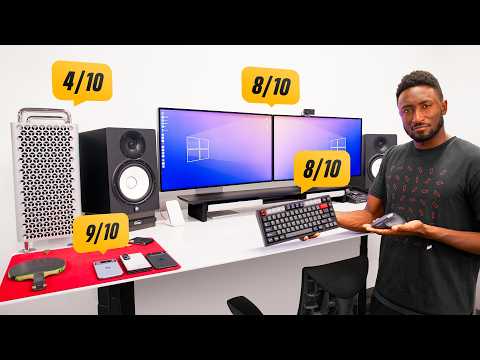
This is where MKBHD's setup gets complicated. The M2 Ultra Mac Pro is genuinely powerful hardware, but Apple skipped it for the M3 and M4 cycles, leaving a very expensive machine aging faster than its price tag suggested it would.
He's flagged it for replacement — which, for a machine that costs as much as a used car, is a bad look for Apple's update cadence.
Specialized Displays vs. General-Purpose Monitors
He runs two Pro Display XDRs, and they're exceptional at exactly one thing: color-accurate professional work. No high refresh rate, no integrated features for everyday use, and a price that makes casual browsing feel vaguely irresponsible.
For color-grading and production, they're the right call. For everything else, you'd want something with a faster panel and fewer feelings about its own importance.
Audio Equipment Selection for Professional Work
His studio monitors are Yamaha HS8s — a standard in production environments for their flat, honest sound response. There's minor RF interference in the setup, which he acknowledges and lives with. Familiar problems are easier to work around than unfamiliar ones.
The headphones are Sennheiser HD 650s, open-back, comfortable for long sessions, and tuned in a way he's internalized over years of use. He can hear his surroundings, which is either a feature or a bug depending on your office situation.
Prioritizing Familiarity and Workflow Over Latest Technology
MKBHD's audio interface software is, by his own account, buggy. He uses it anyway. The hardware works, he knows its quirks, and switching to something new introduces a learning curve that costs more time than the bugs do.
That's the argument in miniature: a tool you've mastered beats a better tool you haven't, almost every time.
Cable Management and Charging Infrastructure
For charging, he runs a multi-device wireless pad for daily carry items and a dedicated fast wireless charger for his phone. The fast charger sits close enough to a speaker to cause occasional interference — a tradeoff he's accepted rather than reorganized his desk to fix.
It's a minor detail, but it illustrates the setup's philosophy: optimize for workflow, tolerate the edge cases.
How Deep Knowledge of Your Tools Enhances Productivity
He runs a mechanical keyboard (Rainy 75) and a Logitech MX Master 4 mouse, and uses both the mouse and an Apple Magic Trackpad at the same time — the trackpad specifically for gesture-based video editing shortcuts he's built into muscle memory.
That dual input setup isn't technically necessary. It's just faster for him, because he's been doing it long enough that thinking about it would slow him down. That's what MKBHD's entire desk review keeps circling back to: the best office desk setup for productivity is the one you've stopped noticing.
Our Analysis: MKBHD nails something the tech press keeps getting wrong — familiarity compounds. A tool you know deeply beats a spec-sheet winner you're still figuring out six months later.
The Mac Pro aging out quietly is the real story here. We're watching the "pro" hardware category splinter: insane specs for shrinking niches, while the actual work gets done on M-series MacBooks nobody puts on a desk tour.
Expect the standing desk and ergonomic furniture market to keep eating the premium peripherals budget — people are finally pricing in their bodies.
Frequently Asked Questions
Is the 'familiarity beats better tools' argument actually true, or is it just a rationalization for not upgrading?
What's the best office layout for productivity — and does MKBHD's setup actually reflect that?
Should the Pro Display XDR still be on anyone's shortlist in 2026, or has it been outpaced?
Is the Herman Miller Embody actually worth the price, or is the 'health investment' framing just a way to justify expensive taste?
Why did Apple skip the Mac Pro for the M3 and M4 cycles, and what does that mean for buyers?
Based on viewer questions and search trends. These answers reflect our editorial analysis. We may be wrong.
Source: Based on a video by Marques Brownlee (MKBHD) — Watch original video
This article was created by NoTime2Watch's editorial team using AI-assisted research. All content includes substantial original analysis and is reviewed for accuracy before publication.